Product overview
Review the tray, adjustment points and in-cabin working position before ordering.
Black Friday Sale! 12% Off Sitewide. Use code: BF2026


Enjoy Tax-free shopping with free shipping on all U.S. orders!
MELIPRON Universal Vehicle Laptop Mount with Dual Cooling Fans is backordered and will ship as soon as it is back in stock.
Sign up to be the first to know when it's here
Couldn't load pickup availability

This Return and Refund Policy applies to all products sold by MELIPRON.
Please inspect your order upon delivery and contact us by email (support@melipron.com) if you have any questions about your order.
You may return an item if:
- Within 30 days of receipt of shipment.
- The product is in resalable condition, unworn or unused, with tags.
- In the original manufacturer's packaging. We strongly recommend you keep the packaging for the first 30 days after purchase.
You are qualified for replacement if
- The item is defective or was damaged in transit. Photos of the defect or damage are required.
- A panel or other part is missing from the package.
- You received the wrong product. A photo of the package label is required.
- We will provide a prepaid return label only when a customer received the wrong product and qualifies for a replacement.
You may request an exchange if:
- Within 30 days of receipt of shipment.
- You will be responsible for paying the return shipping costs in case of a non-defective product.
- The fastest way to ensure you get what you want is to return the item you have, and once the return is accepted, make a separate purchase for the new item.
- Depending on where you live, the time it may take for your exchanged product to reach you may vary.
All items must be returned to the seller with a trackable shipping service. We suggest USPS delivery confirmation service. If your return package does not arrive and you did not use a trackable shipping method, we may be unable to issue a full refund.
To initiate a return, please reach out to us at support@melipron.com. Upon approval of your return request, we will provide you with a return address. Please note that you will be responsible for shipping the item back to us. Make sure to include the RMA reference number we provide you with your return package. Items returned without prior authorization will not be accepted.
All product returns must be in salable condition to receive a full refund. If the item is used or unsalable, the order might be nonrefundable. After inspecting the returned item, we may issue a full refund, a partial refund, or no refund, as appropriate.
Please note: A 5% handling fee will be deducted from the refund amount for processing returns, applicable only to full refunds. This fee covers the administrative costs associated with processing your return, including restocking and handling the returned items.
The handling fee is applied to ensure that we can continue to provide quality service and maintain our inventory effectively. It allows us to manage the logistics involved in returns, ensuring that the process is smooth for all customers.
For example, if your total refund amount is $100, a $5 handling fee will be deducted, resulting in a total refund of $95. This fee is part of our commitment to maintaining efficient operations while providing you with the best possible shopping experience.
- Any item not in its original condition, is damaged or missing parts.
- Any item that is returned more than 30 days after delivery.
Shipping costs are nonrefundable when a customer changes their mind. If you qualify for a refund, the cost of original shipping will be deducted from your refund.
First check your bank account again and then contact your credit card company, it may take some time before your refund is officially posted. If you’ve done all of this, please feel free to contact us at support@melipron.com.
We will notify you once we’ve received and inspected your return, and let you know if the refund was approved or not. If approved, your refund will be issued automatically to your original payment method within 3–5 business days. Please remember it can take some time for your bank or credit card company to process and post the refund.
| Shipping carriers | USPS, FedEx, or UPS |
| Shipping area | The 48 contiguous U.S. states |
Our U.S. warehouse is located in New Jersey.
We do not routinely deliver to the locations below. If your shipping address is in one of these areas, please contact us before placing an order so we can confirm whether a shipping option is available.
We work to deliver every order as quickly as possible. Total delivery time includes processing time plus shipping time.
Processing time: 1–2 business days from the time you place your order until it ships.
Shipping time: 2–8 business days from shipment to delivery.
Processing time: 1–2 business days from the time you place your order until it ships.
Shipping time: 1–3 business days from shipment to delivery.
| Estimated total delivery time | Free shipping: 3–10 business days |
| Express shipping: 2–5 business days |
Business days are Monday through Friday, excluding holidays and weekends.
We do not ship to military addresses (APO/FPO) or P.O. boxes.
Items in the same order may be fulfilled from different locations and may arrive in separate packages. If this happens, you will not incur additional shipping charges. Any applicable shipping charge will be allocated across the packages when the order ships.
Business name: HONG KONG SHOWFORCE E-COMMERCE CO., LIMITED
Address: Room A07, 1701-02, New Trend Centre, 704 Prince Edward Road East, San Po Kong, Hong Kong
Payment methods
Your payment information is processed securely. We do not store credit card details nor have access to your credit card information.
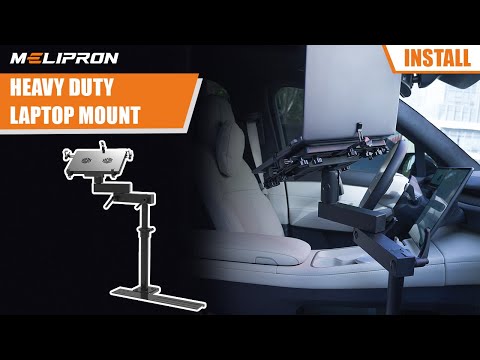
This seat-rail laptop mount places dispatch tools, service records and field notes within reach. The adjustable arm brings the screen toward the center console, while the base connects to the passenger-seat bolts already in your vehicle.

The tray houses two USB-powered fans that move air beneath the computer during reporting, diagnostics and dispatch work. A 1.8 m coiled cable reaches a nearby USB outlet while keeping spare cable close to the mount.
The open tray also gives warm air a direct path away from the laptop base, which supports steady performance through a longer parked work session.
The post adjusts between 11.9 and 20 inches. A 360-degree tray and 180-degree arm bring the computer toward the center console, while the adjustable edge clamps support laptops up to 17 inches.
Set the mount after parking, tighten each joint, and place the screen where maps or work orders stay easy to read.


Four mounting feet support common bolt orientations around the passenger-seat rail. Start with the compatibility guide, select the foot that follows your layout, then secure the base with the original seat hardware.
Typical installation takes about 30 to 45 minutes. The instructions cover the mounting feet, telescopic post, locking joints, tray clamps and fan connection.
Open the installation manualThe thumb-screw connection separates the telescopic post from the base. The low mounting rail stays ready for the next setup, while the passenger area returns to seating use.
Aluminum and steel parts form the working structure, and the coated finish supports regular use in service vehicles.

The first video shows the working range inside a vehicle. The second walks through the hardware and installation sequence.
| Laptop capacity | Fits laptops up to 17 inches |
|---|---|
| Tray adjustment | Width from 10.8 to 16.9 inches, depth from 7.8 to 14.5 inches |
| Post height | Adjusts from 11.9 to 20 inches |
| Working range | 360-degree tray rotation with a 180-degree swing arm |
| Cooling system | Two USB-powered fans with a 1.8 m coiled cable |
| Mounting method | Passenger-seat rail bolts with four included mounting feet |
| Primary materials | Aluminum and steel with a coated finish |
| Package contents | Laptop tray, arm, telescopic post, base rail, mounting feet and installation hardware |
Vehicle fit follows the bolt position, floor clearance and console clearance around the passenger seat. Compare your layout with the compatibility guide before ordering, then confirm that the selected foot can sit flat beside the rail.
The mount works with many trucks, vans, SUVs and cars that use a compatible seat-bolt layout. Share the vehicle year, make and model with MELIPRON support when you want a second fit review.
Customers posted 216 global ratings for this product as of November 2, 2026.
MELIPRON provides fitment guidance, installation support and replacement-part assistance.
The MELIPRON return policy gives eligible orders a 30-day return window after delivery.
The product includes a written manual and a step-by-step installation video.
Fit follows the passenger-seat bolt layout and the open space beside the rail. Compare the bolt position with the compatibility guide, then check console and seat-movement clearance before ordering.
The adjustable clamps support laptops up to 17 inches. The tray spans 10.8 to 16.9 inches in width and 7.8 to 14.5 inches in depth.
The base shares the original passenger-seat rail bolts. Four mounting feet cover several bolt orientations, and a typical installation takes about 30 to 45 minutes.
Connect the coiled USB cable to vehicle USB power or a compatible adapter. The two fans direct airflow toward the laptop base during a parked work session.
The quick-release post detaches through the thumb-screw connection, leaving the low base in place for the next setup. Confirm seat movement and floor clearance before travel.
Use the workstation while the vehicle is parked. Secure or stow the tray before travel, and include the mount fasteners in routine vehicle checks.
We primarily ship within the 48 contiguous United States and do not cover Alaska, Hawaii, APO/FPO addresses, US Protectorates, or international locations through our standard services. If you're outside these areas, please send us a private message. We'll be happy to provide a special invoice including shipping and pricing for your location.
We accept various payment methods, including credit cards (Visa, MasterCard, American Express, JCB) and PayPal. The credit card companies listed above are the most commonly used credit cards on this website. Do not worry if your credit card company is not listed, we encourage you to go ahead and make the purchase.
Our van accessories support models including Ford Transit, Mercedes-Benz Sprinter, Ram ProMaster, Chevrolet Express and GMC Savana. Check each product page for specific model, year, roof height and wheelbase compatibility.
After placing your order, you will receive a tracking number. We will email you any updates on your delivery information. You can also track your order by logging into the "Track My Order" page on our website and entering your tracking number.

This seat-rail laptop mount places dispatch tools, service records and field notes within reach. The adjustable arm brings the screen toward the center console, while the base connects to the passenger-seat bolts already in your vehicle.
The tray houses two USB-powered fans that move air beneath the computer during reporting, diagnostics and dispatch work. A 1.8 m coiled cable reaches a nearby USB outlet while keeping spare cable close to the mount.
The open tray also gives warm air a direct path away from the laptop base, which supports steady performance through a longer parked work session.
The post adjusts between 11.9 and 20 inches. A 360-degree tray and 180-degree arm bring the computer toward the center console, while the adjustable edge clamps support laptops up to 17 inches.
Set the mount after parking, tighten each joint, and place the screen where maps or work orders stay easy to read.
Four mounting feet support common bolt orientations around the passenger-seat rail. Start with the compatibility guide, select the foot that follows your layout, then secure the base with the original seat hardware.
Typical installation takes about 30 to 45 minutes. The instructions cover the mounting feet, telescopic post, locking joints, tray clamps and fan connection.
Open the installation manualThe thumb-screw connection separates the telescopic post from the base. The low mounting rail stays ready for the next setup, while the passenger area returns to seating use.
Aluminum and steel parts form the working structure, and the coated finish supports regular use in service vehicles.
The first video shows the working range inside a vehicle. The second walks through the hardware and installation sequence.
| Laptop capacity | Fits laptops up to 17 inches |
|---|---|
| Tray adjustment | Width from 10.8 to 16.9 inches, depth from 7.8 to 14.5 inches |
| Post height | Adjusts from 11.9 to 20 inches |
| Working range | 360-degree tray rotation with a 180-degree swing arm |
| Cooling system | Two USB-powered fans with a 1.8 m coiled cable |
| Mounting method | Passenger-seat rail bolts with four included mounting feet |
| Primary materials | Aluminum and steel with a coated finish |
| Package contents | Laptop tray, arm, telescopic post, base rail, mounting feet and installation hardware |
Vehicle fit follows the bolt position, floor clearance and console clearance around the passenger seat. Compare your layout with the compatibility guide before ordering, then confirm that the selected foot can sit flat beside the rail.
The mount works with many trucks, vans, SUVs and cars that use a compatible seat-bolt layout. Share the vehicle year, make and model with MELIPRON support when you want a second fit review.
Customers posted 216 global ratings for this product as of November 2, 2026.
MELIPRON provides fitment guidance, installation support and replacement-part assistance.
The MELIPRON return policy gives eligible orders a 30-day return window after delivery.
The product includes a written manual and a step-by-step installation video.
Fit follows the passenger-seat bolt layout and the open space beside the rail. Compare the bolt position with the compatibility guide, then check console and seat-movement clearance before ordering.
The adjustable clamps support laptops up to 17 inches. The tray spans 10.8 to 16.9 inches in width and 7.8 to 14.5 inches in depth.
The base shares the original passenger-seat rail bolts. Four mounting feet cover several bolt orientations, and a typical installation takes about 30 to 45 minutes.
Connect the coiled USB cable to vehicle USB power or a compatible adapter. The two fans direct airflow toward the laptop base during a parked work session.
The quick-release post detaches through the thumb-screw connection, leaving the low base in place for the next setup. Confirm seat movement and floor clearance before travel.
Use the workstation while the vehicle is parked. Secure or stow the tray before travel, and include the mount fasteners in routine vehicle checks.